
The 39 Best Free AI Tools in 2026: Complete Guide for Students, Businesses, Developers & Creators
39 Best Free AI Tools in 2026 for Students, Businesses & Creators. Artificial intelligence is no longer something only giant tech companies can afford. In 2026, some of the best AI tools in the world are completely free to use, and honestly, that has changed the way people work, learn, create content, write code, edit videos, and even run businesses.
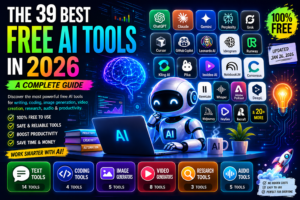
A few years ago, most powerful AI tools sat behind expensive subscriptions. If you wanted advanced image generation, AI coding help, or research assistants, you usually needed a premium plan.
That’s not really the case anymore.
Today, free AI tools have become surprisingly capable. Some tools now offer features that were enterprise-only not long ago. Students are using AI to study smarter, developers are speeding up coding workflows, marketers are automating repetitive tasks, and creators are building entire content pipelines without spending money.
In real production work, one common issue I’ve seen is people wasting time switching between dozens of AI apps that barely help. The truth is, only a handful of free AI tools actually provide real value consistently.
That’s exactly why this guide exists.
I tested, researched, and compared the best free AI tools in 2026 across categories like writing, coding, image generation, video creation, research, and audio. Some are perfect for beginners, while others are powerful enough for professional work.
Let’s go through them properly.
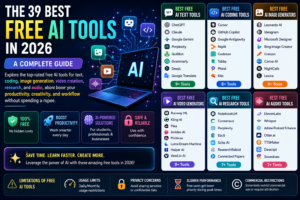
Best Free AI Text Tools in 2026
AI writing tools are now much more than simple chatbots. They help with brainstorming, summarizing long documents, fixing grammar, translating content, writing emails, and even generating research ideas.
1. ChatGPT
OpenAI remains one of the most popular AI platforms in the world.
The free version of ChatGPT in 2026 gives users access to lightweight GPT-5 models along with GPT-4o mini. For daily tasks like writing blogs, generating ideas, drafting emails, or fixing code snippets, it works extremely well.
What actually happens during real usage is that ChatGPT becomes more useful when you learn how to prompt properly. Many beginners blame the AI when the real issue is vague instructions.
Best for:
- Blogging
- Brainstorming
- Coding help
- Research assistance
- Email writing
2. Claude
Anthropic developed Claude, and honestly, it’s one of the most natural-sounding AI assistants available right now.
Claude feels less robotic compared to many competitors. It’s excellent for long-form writing and understanding complex instructions.
One thing I noticed while testing Claude is that it handles context extremely well when editing large documents.
Best for:
- Long-form writing
- Human-like responses
- Technical explanations
- Editing articles
3. Google Gemini
Google has heavily improved Gemini in 2026.
Gemini integrates deeply with:
- Google Docs
- Gmail
- Google Sheets
- Drive
- Search
That ecosystem integration makes it practical for students and office work.
Best for:
- Productivity
- Research
- Google Workspace users
- Data analysis
4. Perplexity
Perplexity AI is honestly one of the smartest AI research tools right now.
Unlike traditional search engines, it summarizes information directly while citing sources.
For research-heavy tasks, this saves a huge amount of time.
Best for:
- Research
- Fact-checking
- Quick summaries
- Learning new topics
Best Free AI Coding Tools in 2026
AI coding assistants have become incredibly useful for developers, students, and even beginners learning programming.
5. Cursor
Cursor is currently one of the best AI coding editors available.
Instead of just autocompleting lines, it understands project structure and edits multiple files intelligently.
In real development workflows, Cursor dramatically speeds up repetitive coding tasks.
Best for:
- Full-stack developers
- Refactoring code
- AI-assisted debugging
- Faster development
6. GitHub Copilot
GitHub Copilot remains one of the most trusted coding assistants.
The free version now offers enough monthly completions for most students and beginner developers.
Best for:
- VS Code users
- Fast coding
- Code suggestions
- Learning programming
7. Google Antigravity
Google’s Antigravity editor became surprisingly popular in 2026.
It acts more like an autonomous coding agent than a normal assistant.
What actually happens is the AI can:
- Install packages
- Run commands
- Fix files
- Test apps automatically
That feels very different from older coding tools.
Best for:
- AI agents
- Beginners
- App building
- Workflow automation
Best Free AI Image Generation Tools in 2026
AI image generation has exploded this year.
Creators now generate thumbnails, social media posts, product designs, blog graphics, and ad creatives within minutes.
8. Leonardo AI
Leonardo AI offers one of the best free image generation systems currently available.
The free plan is generous and supports commercial usage.
One thing I really like about Leonardo AI is its consistency across styles.
Best for:
- Thumbnail creation
- Concept art
- Gaming artwork
- Marketing creatives
9. ChatGPT Image Generation
OpenAI’s image tools became significantly smarter in 2026.
The conversational editing experience feels natural because you can simply describe modifications instead of manually editing layers.
Best for:
- Blog graphics
- Infographics
- Quick edits
- AI artwork
10. Ideogram
Ideogram is famous for accurate text rendering inside AI images.
Most AI image generators still struggle with typography, but Ideogram handles text surprisingly well.
Best for:
- Posters
- Logos
- Typography
- Social graphics
Best Free AI Video Generators in 2026
AI video generation is currently one of the fastest-growing categories online.
Creators, YouTubers, and marketers are using AI video tools heavily for Shorts, Reels, and faceless content.
11. Runway ML
Runway remains one of the best cinematic AI video platforms available.
It offers advanced camera movement controls and realistic motion generation.
Best for:
- Cinematic videos
- AI filmmaking
- Motion graphics
- Professional editing
12. Kling AI
Kling AI became massively popular because of its realistic motion quality.
Compared to many competitors, human movement looks smoother and more believable.
Best for:
- Realistic AI videos
- Character animation
- Product videos
13. Pika
Pika focuses heavily on creative motion effects.
Its physics effects are honestly fun to use.
You can:
- Melt objects
- Inflate items
- Squish animations
- Add stylized effects
Best for:
- Viral social videos
- Creative edits
- Fun animations
14. Invideo AI
Invideo simplifies video creation dramatically.
You type a script or idea, and the AI generates:
- Footage
- Voiceovers
- Captions
- Scene transitions
This saves beginners huge amounts of editing time.
Best for:
- YouTube automation
- Shorts
- Business videos
- Marketing content
Best Free AI Research Tools in 2026
Research AI tools help users process information faster without drowning in tabs and documents.
15. NotebookLM
NotebookLM might honestly be one of Google’s most underrated AI products.
You can upload:
- PDFs
- Research papers
- Notes
- Websites
Then the AI creates a knowledge assistant specifically trained on your uploaded sources.
One common issue I’ve seen with general chatbots is hallucination. NotebookLM reduces that problem significantly because it stays grounded in your actual documents.
Best for:
- Students
- Researchers
- Study notes
- Knowledge management
16. Consensus
Consensus focuses heavily on academic research.
Instead of random internet opinions, it pulls answers from scientific studies.
Best for:
- Medical research
- Academic analysis
- Scientific summaries
- Evidence-based answers
Best Free AI Audio Tools in 2026
Audio AI tools are becoming extremely important for podcasts, meetings, voiceovers, and transcription workflows.
17. ElevenLabs
ElevenLabs currently offers some of the most realistic AI voices available.
The natural breathing and tone variation sound incredibly human.
Best for:
- Voiceovers
- YouTube narration
- Podcast intros
- AI dubbing
18. Whisper
Whisper remains one of the best open-source transcription systems available.
If you’re comfortable with technical setups, Whisper gives professional-level transcription completely free.
Best for:
- Transcriptions
- Interviews
- Podcast conversion
- Subtitles
19. Adobe Podcast Enhance
Adobe Podcast Enhance is honestly one of the easiest audio cleanup tools online.
It removes:
- Background noise
- Echo
- Bad microphone quality
And it does this automatically.
Best for:
- Podcasts
- YouTube audio
- Voice cleanup
- Meetings
Limitations of Free AI Tools
Free AI tools are powerful, but they aren’t perfect.
There are some important trade-offs.
1. Usage Limits
Most free plans have:
- Message caps
- Daily credits
- Watermarks
- Export limits
You’ll eventually hit restrictions if you use them heavily.
2. Privacy Concerns
This part is important.
Never upload:
- Private company files
- API keys
- Financial data
- Sensitive documents
to free AI systems unless you fully trust the platform.
In real production environments, this becomes a major security concern.
3. Slower Performance
Free users usually get lower priority.
That means:
- Slower generations
- Queue delays
- Fewer advanced features
especially during peak traffic.
How to Choose the Best Free AI Tool
The best AI tool depends entirely on your workflow.
For example:
- Writers → ChatGPT or Claude
- Developers → Cursor or Copilot
- Researchers → NotebookLM or Perplexity
- Designers → Leonardo AI or Ideogram
- Video creators → Runway or Kling AI
One mistake beginners make is trying every trending AI app instead of mastering a few genuinely useful ones.
Honestly, learning prompting properly matters more than having 50 AI tools installed.
Final Thoughts
AI tools in 2026 are more accessible than ever.
You no longer need expensive subscriptions just to experiment with powerful artificial intelligence tools. Free AI platforms now help with:
- Writing
- Coding
- Research
- Image creation
- Video generation
- Audio production
- Productivity
And the competition between companies is making these tools better every month.
What actually matters now is learning how to use them effectively.
The people getting the biggest advantage from AI aren’t necessarily the ones paying the most money. Usually, they’re the people who understand workflows, prompting, automation, and practical implementation.
That’s the real difference.
If you’re just starting out, begin with:
- ChatGPT
- Claude
- Perplexity
- Cursor
- Leonardo AI
- NotebookLM
Master those first before chasing every new AI trend online.
Because honestly, AI is evolving so fast that understanding the fundamentals matters much more than constantly jumping between tools.
And right now, there has never been a better time to start learning.